
AI automation chat
Describe the journey you want in plain English and AI automation chat builds the flow for you — triggers, emails, waits, and branches included. It's the fastest way to stand up a sophisticated automation.
Build a flow by describing it
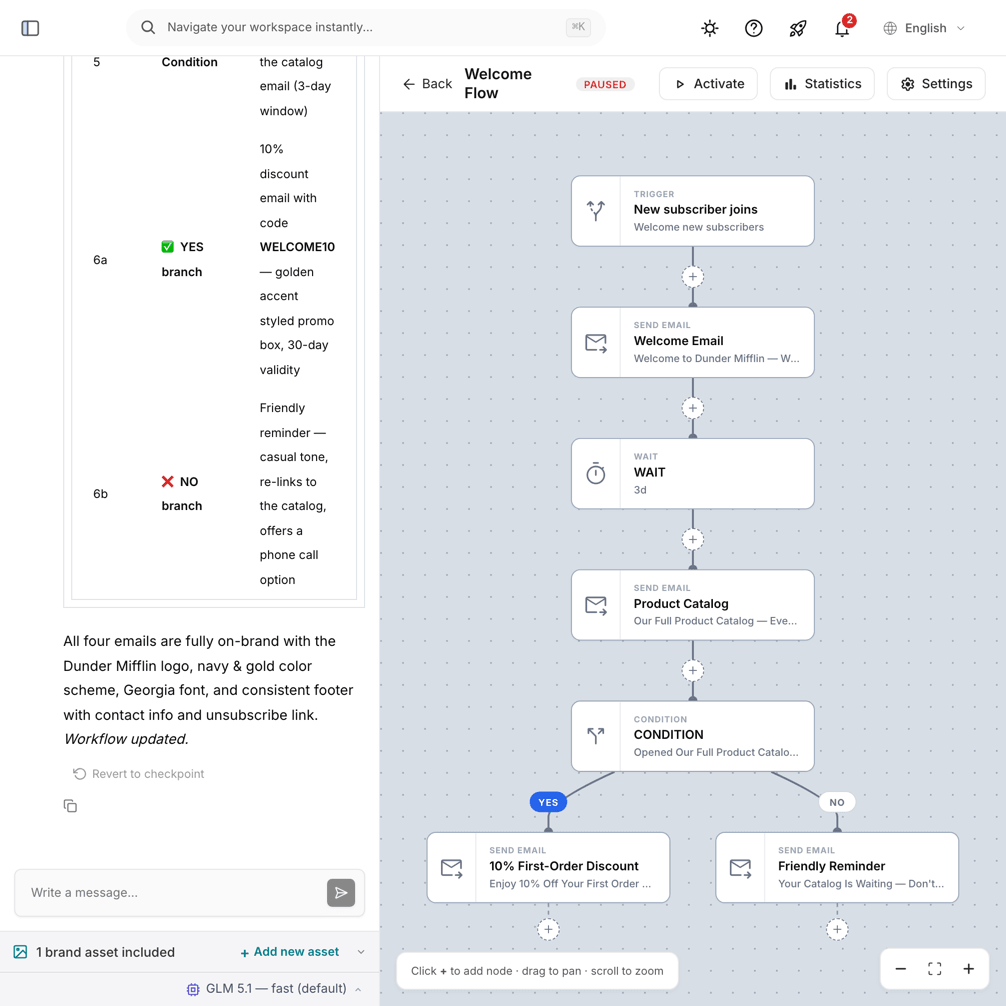
Instead of dragging every node onto the canvas, just say what you're trying to achieve — for example, “Welcome new subscribers with an intro email, wait two days, and if they didn't open it, send a reminder.” The AI assembles the corresponding trigger and nodes, ready for you to review.
Edit and refine in conversation
The flow isn't fixed once it's built. Keep chatting to adjust it: “add a 3-day wait before the last email,” “tag everyone who clicks,” or “split the path for people on the Pro plan.” The AI updates the flow in place, so you shape the journey through dialogue rather than manual wiring.
You stay in control
AI automation chat and the visual editor work on the same flow, so you can move between them freely. Let the AI scaffold the structure, then fine-tune individual nodes by hand — or vice versa. Nothing goes live until you activate the automation yourself.
Like the Design Studio, the automation chat has its own AI model picker in the composer with multiple models available through your OpenRouter key. The preference is remembered separately from the Studio's.
Tips for great flows
- State the trigger, the emails, the timing, and any branches in your request.
- Build incrementally — start with the happy path, then add conditions.
- Review the generated triggers and nodes before activating.
Token usage
Building and editing flows with AI uses your monthly AI token allotment, like the other AI features. The allotment resets each billing cycle and scales with your plan.
Example prompts
- “Welcome new subscribers, wait a day, then send a getting-started tip.”
- “If a contact clicks the offer, tag them interested and send a follow-up; if not, wait three days and try a different angle.”
- “Split-test two subject lines 70/30 on the welcome email.”
- “Send a birthday email each year with a discount code.”
Frequently asked questions
Can I edit what the AI built? Absolutely. Keep chatting to adjust the flow, or open the visual editor and change nodes by hand — both work on the same flow.
What if the AI gets it wrong? You can revert AI changes to an earlier version, and nothing goes live until you activate the automation yourself, so you're always in control.